Key takeaways
- Format: Cropped app screen beside a two-line headline.
- Best for: Coaching, learning and self-improvement apps.
- Hook: Real career scenarios like asking for a raise.
- Reuse it: Show specific use cases inside the app screen.
Available sizes
What is a product shot ad?
A product shot ad puts the product itself at the centre of the frame, usually on a clean or styled background with little text. It works best when the packaging or product is distinctive enough to stop the scroll and the viewer already understands what it does.
See all product shot ads →Why this product shot ad works
- 01
Relatable scenarios
'Requesting an overdue raise' names a moment many people dread.
- 02
Scores as progress
Numbers make soft skills feel measurable.
- 03
Premium dark palette
Green and amber gradients feel calm and executive.
- 04
Clear promise
Confidence and clarity are outcomes everyone wants at work.
Full creative breakdown
Who this ad targets
This ad targets ambitious professionals aged 25 to 45, including new managers and people preparing for salary talks or performance reviews. They want to communicate better but feel anxious about difficult conversations. They use apps for self-improvement and value private practice before high-stakes moments. Interest targeting is a good starting point, and lookalike audiences built from past purchasers are a strong next step once the ad has data.
Copywriting analysis
The headline uses two simple, positive words that describe the result. The supporting line names the product type and the use case, while 'poise and control' adds emotional reassurance. The app screen does the rest by showing exact scenarios. The copy is deliberately sparse, which signals confidence and premium positioning. One clear line explains the benefit, and the product image fills in everything else, so nothing distracts from the hero. Together, the words and visuals give the viewer one clear reason to click.
Visual design
The phone is cropped off the right edge, which adds depth and draws the eye inward. Text sits on the left in large cream type for strong contrast. The blue and gold score rings echo the warm-cool gradient of the background. The square 1:1 format keeps every element readable on mobile, and the clear hierarchy guides the eye from brand to message to product in a natural order.
How to adapt this template for your brand
- Shoot your coaching app on a clean, single-colour background that complements its finish.
- Light it softly so materials and details read clearly at thumbnail size.
- Add one short headline about the core benefit above or below the product.
- Keep the logo small and consistent, top or bottom centre.
- Test background colours to match seasonal campaigns or audience segments.
Tips for e-learning ads on Meta
On LinkedIn, run this coaching app creative as single-image Sponsored Content targeted by job title and industry, and keep the intro text under 150 characters so it is not truncated. On Meta, use the same 1:1 file in Feed and crop a 4:5 version for mobile. Keep key text away from the edges, and open the primary text with the work problem the product solves.
About this creative
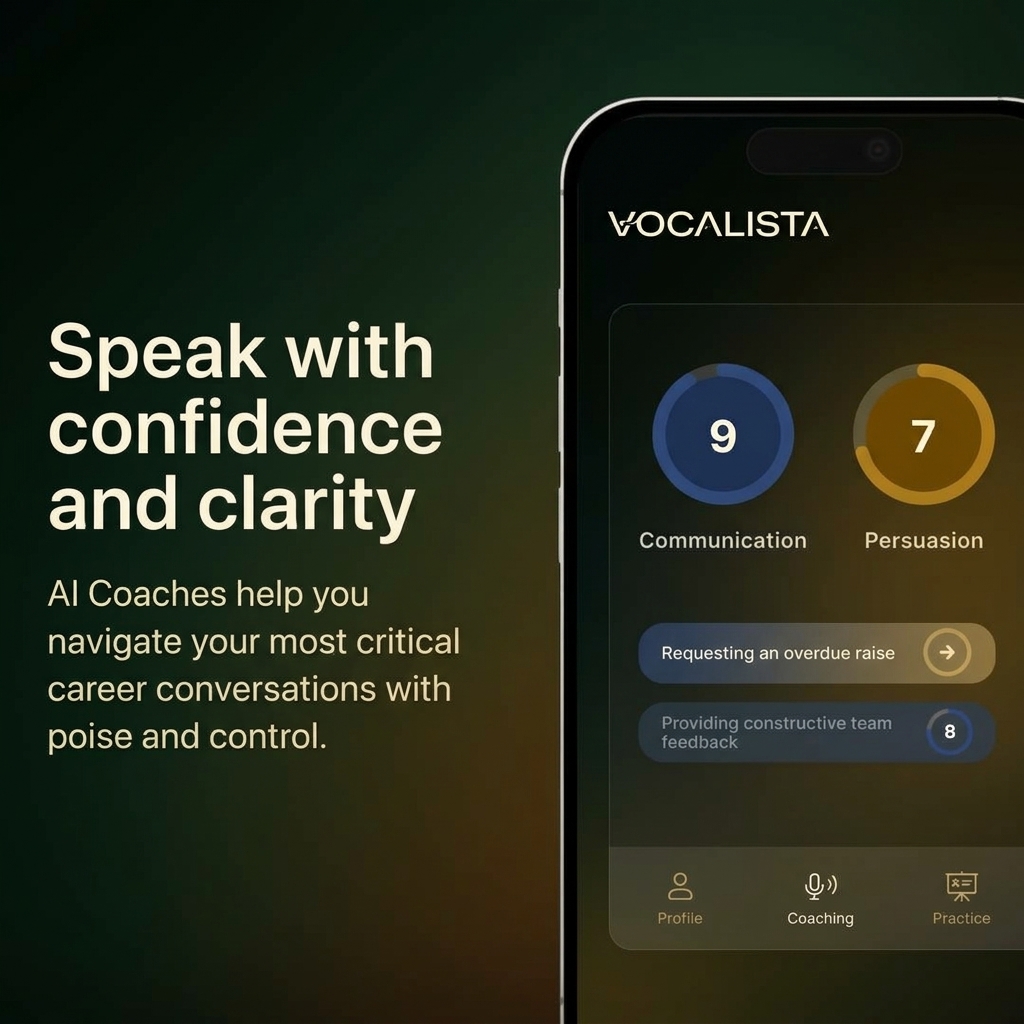
The creative uses a dark gradient that moves from deep green to warm amber. On the left, a large cream headline reads speak with confidence and clarity, followed by a line about AI coaches helping with critical career conversations. On the right, a cropped phone shows the Vocalista app with two circular scores, 9 for communication and 7 for persuasion, and two scenario cards: requesting an overdue raise and providing constructive team feedback, scored 8. A bottom navigation bar lists profile, coaching and practice. As a product shot ad, it puts the hardware front and centre and lets the design speak for itself. The clean background removes every distraction, so the eye goes straight to the materials, shape and finish. A short line of copy frames the benefit while the image does the convincing, which suits premium products where looks are part of the purchase decision.
Meta ad · 1200 × 1200 · E-learning
AI Coaching App Ad Template – Product shot Example
This ai coaching app ad template uses a product shot format to show a phone showing communication and persuasion scores with career practice scenarios. It is a strong reference for coaching, learning and self-improvement apps. Below: the copy, why it works and five steps to adapt it.
Added
All brand names and logos are property of their owners. Adplaylist is not affiliated with or endorsed by these brands.
Details
Ad copy
Primary text
Asking for a raise? Giving tough feedback? Vocalista's AI coaches help you practise your most important career conversations so you can speak with confidence and clarity.
Description
AI coaching for career conversations
On-image text
Speak with confidence and clarity | AI Coaches help you navigate your most critical career conversations with poise and control. | VOCALISTA | 9 Communication | 7 Persuasion | Requesting an overdue raise | Providing constructive team feedback | 8 | Profile | Coaching | Practice
Headline ideas for this template
- 1Practise the raise talk before it counts.
- 2Your AI coach for tough conversations.
- 3Speak up with confidence.
- 4Score your communication skills.
- 5Turn hard talks into wins.
Meta image ad specs
| Placement | Ratio | Size (px) |
|---|---|---|
| Feed | 1:1 or 4:5 | 1080×1080 / 1080×1350 |
| Marketplace | 1:1 | 1200×1200 |
| Messenger inbox | 1:1 | 1200×1200 |
| Stories & Reels | 9:16 | 1080×1920 |
This template is 1:1. Request 4:5 or 9:16 to cover all placements.
Browse similar by tag