Key takeaways
- Format: Feature callout – phone UI demo over a muted lifestyle background.
- Best for: Planning, mapping or productivity apps launching a tool.
- Hook: A real route with real stats: 21.7 mi, 2,610 ft, 12–14 hr.
- Reuse it: Show your tool's output with concrete numbers, and mute the background so the UI pops.
Available sizes
What is a feature callout ad?
A feature callout ad is a static image that shows a single product with short text labels pointing to its key features or benefits, usually joined to the product by thin lines. It explains several selling points at a glance without a long caption, which is why it's common for supplements, skincare, electronics and kitchenware.
See all feature callouts ads →Why this feature callouts ad works
- 01
Numbers make it tangible
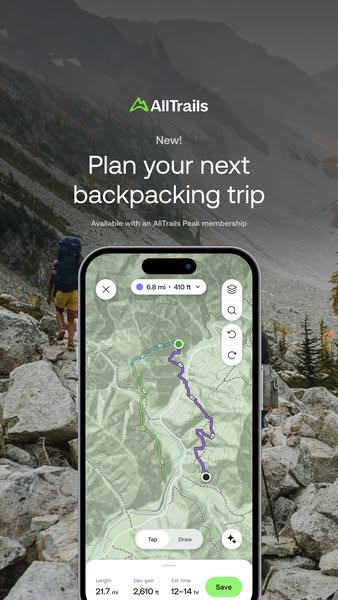
Length, elevation and time estimates show exactly what the planner calculates for you.
- 02
Interaction cues
'Tap' and 'Draw' options and undo/redo buttons signal the tool is easy and flexible.
- 03
Background sets the mission
A backpacker on a rugged trail explains why you'd plan the route in the first place.
- 04
Consistent launch system
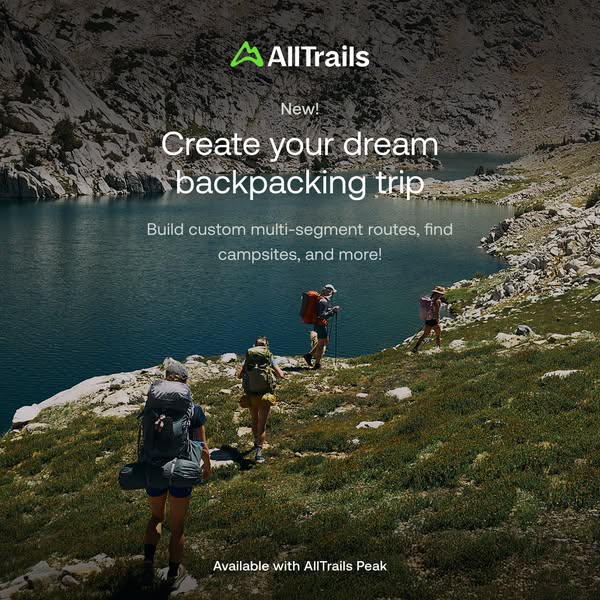
'New!' and the Peak tier line tie this to the square lifestyle version for campaign cohesion.
Full creative breakdown
Who this ad targets
Serious hikers and backpackers who plan custom multi-day routes rather than following popular trails, including people who previously used paper maps or desktop tools. Also existing AllTrails Plus users who are prime candidates to upgrade to Peak. Likely aimed at US outdoor and backpacking interests aged 25–55, engaged app users and lookalikes, with Stories and Reels placements during trip-planning season.
Copywriting analysis
'Plan your next backpacking trip' is direct and practical, contrasting with the more aspirational square companion ad ('Create your dream backpacking trip'). The word 'next' assumes the viewer already backpacks, qualifying the audience. 'New!' and 'Available with an AllTrails Peak membership' frame it as a premium launch. Inside the UI, micro-copy like 'Est. time 12–14 hr' and 'Save' demonstrates real utility and invites the viewer to imagine planning their own route. The practical tone suits viewers already in planning mode, who want to know what the tool does, not how it feels.
Visual design
The background photo is desaturated and slightly dark so the bright green map and purple route stand out. The phone fills most of the frame from the middle down, giving the UI enough size to be legible on mobile. Text is centred at the top with clear hierarchy. Rounded white buttons and a lime 'Save' pill echo the brand colour and draw attention to the action.
How to adapt this template for your brand
- Build a realistic example in your tool that shows impressive but believable output.
- Screenshot it with summary stats visible at the bottom.
- Choose a background photo of the user's goal and reduce its saturation.
- Place a 'New!' kicker, a practical headline and a tier line at the top.
- Make the phone large enough that key numbers are readable on a small screen.
Tips for backpacking ads on Meta
Built for Meta Stories and Reels; a screen recording of the route being drawn would make an even stronger Reel. Keep the summary bar above the bottom UI overlay or move it up slightly. Run alongside the square lifestyle version and let Meta optimise placements. Use 'Learn More' to a feature page or 'Download' for app installs.
About this creative
A vertical feature ad for the AllTrails Peak route builder. The background is a muted, desaturated photo of a hiker with a large pack walking up a boulder-strewn trail between grey mountains and autumn larches. The top of the frame holds the green AllTrails logo, a 'New!' label, the large white headline 'Plan your next backpacking trip' and a small line, 'Available with an AllTrails Peak membership'. The lower two-thirds show a phone with the route builder open on a green topographic map. A purple route snakes from a green start dot to a black end point, with a dotted blue alternate segment. A pill at the top reads '6.8 mi · 410 ft'; side buttons offer layers, search, undo and redo. At the bottom, a 'Tap / Draw' toggle and a summary bar show 'Length 21.7 mi', 'Elev gain 2,610 ft', 'Est. time 12–14 hr' and a green 'Save' button. The ad is a clear, functional demonstration of the tool.
Meta ad · 338 × 600 · Backpacking
AllTrails Peak Ad: Plan Your Next Backpacking Trip
This vertical AllTrails ad shows the new Peak route builder on a phone held over a rocky mountain trail, complete with route length, elevation gain and estimated time. It is a feature-callout format that proves a planning tool's value with real numbers – a reusable template for any productivity or planning app launch.
Added
All brand names and logos are property of their owners. Adplaylist is not affiliated with or endorsed by these brands.
Details
Ad copy
Primary text
New! Plan your next backpacking trip with the AllTrails Peak route builder. Tap or draw your route, see length, elevation gain and estimated time instantly, then save it for the trail.
Description
New route builder – available with AllTrails Peak.
On-image text
AllTrails | New! | Plan your next backpacking trip | Available with an AllTrails Peak membership | 6.8 mi · 410 ft | Tap | Draw | Length 21.7 mi | Elev gain 2,610 ft | Est. time 12–14 hr | Save
Headline ideas for this template
- 1Draw your route, we'll do the math
- 2Plan multi-day hikes in a few taps
- 3Know the miles, gain and time before you go
- 4Your custom backpacking route builder
- 5From idea to route in minutes
Meta image ad specs
| Placement | Ratio | Size (px) |
|---|---|---|
| Feed | 1:1 or 4:5 | 1080×1080 / 1080×1350 |
| Marketplace | 1:1 | 1200×1200 |
| Messenger inbox | 1:1 | 1200×1200 |
| Stories & Reels | 9:16 | 1080×1920 |
This template is 1:1. Request 4:5 or 9:16 to cover all placements.