Key takeaways
- Format: Vertical product UI shot with floating feature-callout chips.
- Best for: App redesigns, software updates and new platform integrations.
- Hook: A short 'X, reimagined' headline over a glowing interface.
- Reuse it: Show your real UI in a device frame and float 2–3 feature tags around it.
Available sizes
What is a product shot ad?
A product shot ad puts the product itself at the centre of the frame, usually on a clean or styled background with little text. It works best when the packaging or product is distinctive enough to stop the scroll and the viewer already understands what it does.
See all product shot ads →Why this product shot ad works
- 01
The product is the hero
A real interface proves the redesign instead of describing it. Viewers immediately see what's new.
- 02
Floating callouts explain features
Chips like 'Shuffle play' and 'Ask Siri' highlight benefits at a glance and add 3D depth to a flat screen.
- 03
Keynote-style headline
'Reimagined' echoes Apple-style launch language, framing the update as a major leap and fitting the CarPlay context.
- 04
Premium dark atmosphere
The dark gradient and soft glow suggest night driving and high-end tech, matching Qobuz's hi-res positioning.
Full creative breakdown
Who this ad targets
The ad targets iPhone users who drive cars with Apple CarPlay and care about music quality, typically aged 25–55. Existing Qobuz subscribers are a key audience, as the ad encourages them to use the app in the car. It also reaches Spotify and Apple Music users who spend a lot of time commuting and might switch for better sound and a cleaner in-car experience. Audiophiles with premium car audio systems are a strong niche.
Copywriting analysis
The headline 'CarPlay, reimagined' is just two words, using a comma for a dramatic pause. 'Reimagined' implies a fundamental redesign rather than a minor update, borrowing the confident tone of Apple product launches. The rest of the copy lives in the interface and callouts: 'Shuffle play', 'Explore by genre' and 'Ask Siri to Play Audio' are feature names that double as benefits, explaining what you can do in the car without distraction. The tagline 'Rediscover music' ties it back to the brand promise. There's no offer or price, keeping the focus on the product experience.
Visual design
The design uses a dark navy gradient with a centred purple-blue glow, giving the screen a halo effect. The CarPlay mockup has a thin luminous border and slight perspective, making it feel like a physical display. Album artwork adds pops of colour inside an otherwise monochrome palette. Glassmorphism callout chips with icons overlap the screen edges for depth. White geometric sans-serif typography is centred for the headline, while the logo sits top-left, following a clean, tech-launch hierarchy.
How to adapt this template for your brand
- Take a clean screenshot of your new interface and place it in a device or dashboard frame.
- Set it on a dark gradient background with a subtle brand-coloured glow behind it.
- Write a two-word 'Product, reimagined' style headline.
- Add 2–3 floating glassy chips naming your key new features with icons.
- Place your logo and tagline top-left and keep everything else minimal.
Tips for music streaming ads on Meta
On Meta, target iOS users with interests in cars, commuting, hi-fi audio and Apple CarPlay, and retarget existing Qobuz app users. In Stories and Reels, the screen sits in the middle safe zone, but check that the lower callouts aren't hidden by captions. A short screen-recording video of navigating the CarPlay UI would perform strongly. Use an app-install or deep-link destination so users can try the feature immediately.
About this creative
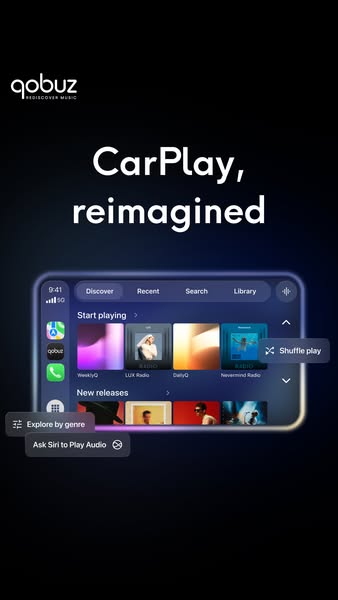
This vertical Qobuz ad launches a redesigned CarPlay app. The background is a deep navy-to-black gradient with a soft purple and blue glow in the centre, creating a premium, nighttime-drive atmosphere. The Qobuz logo with the tagline 'Rediscover music' sits top left, and the headline 'CarPlay, reimagined' dominates the upper third in large white type. Below, a wide CarPlay screen mockup glows with a subtle neon edge. It shows the Qobuz interface with tabs for Discover, Recent, Search and Library, a 'Start playing' row of album tiles such as WeeklyQ, LUX Radio, DailyQ and Nevermind Radio, plus a 'New releases' row. Floating glassy callout chips point out key features: 'Shuffle play' on the right, 'Explore by genre' and 'Ask Siri to Play Audio' on the left, slightly overlapping the screen. The callouts add depth and explain functionality without long copy, making the ad feel like a sleek product keynote slide.
Meta ad · 338 × 600 · Music Streaming
Qobuz 'CarPlay, Reimagined' Product UI Ad
This Qobuz ad announces its redesigned CarPlay experience with a glowing dashboard-screen mockup on a dark background and floating feature tags like Shuffle play and Ask Siri. It is a sleek product-shot template for app updates, new integrations and any software feature launch where the interface itself is the hero.
Added
All brand names and logos are property of their owners. Adplaylist is not affiliated with or endorsed by these brands.
Details
Ad copy
Primary text
Your drive deserves better sound. The new Qobuz CarPlay experience brings Discover, personalised mixes, shuffle play and Siri control straight to your dashboard.
Description
Hi-res music, redesigned for the road.
On-image text
qobuz REDISCOVER MUSIC | CarPlay, reimagined | (UI) Discover, Recent, Search, Library, Start playing, WeeklyQ, LUX Radio, DailyQ, Nevermind Radio, New releases | Shuffle play | Explore by genre | Ask Siri to Play Audio
Headline ideas for this template
- 1Hi-Res Sound for Every Drive
- 2Your Commute Just Got an Upgrade
- 3The Best-Sounding App on CarPlay
- 4Discover More Music on the Road
- 5Just Ask Siri: Play Qobuz
Meta image ad specs
| Placement | Ratio | Size (px) |
|---|---|---|
| Feed | 1:1 or 4:5 | 1080×1080 / 1080×1350 |
| Marketplace | 1:1 | 1200×1200 |
| Messenger inbox | 1:1 | 1200×1200 |
| Stories & Reels | 9:16 | 1080×1920 |
This template is 1:1. Request 4:5 or 9:16 to cover all placements.