Key takeaways
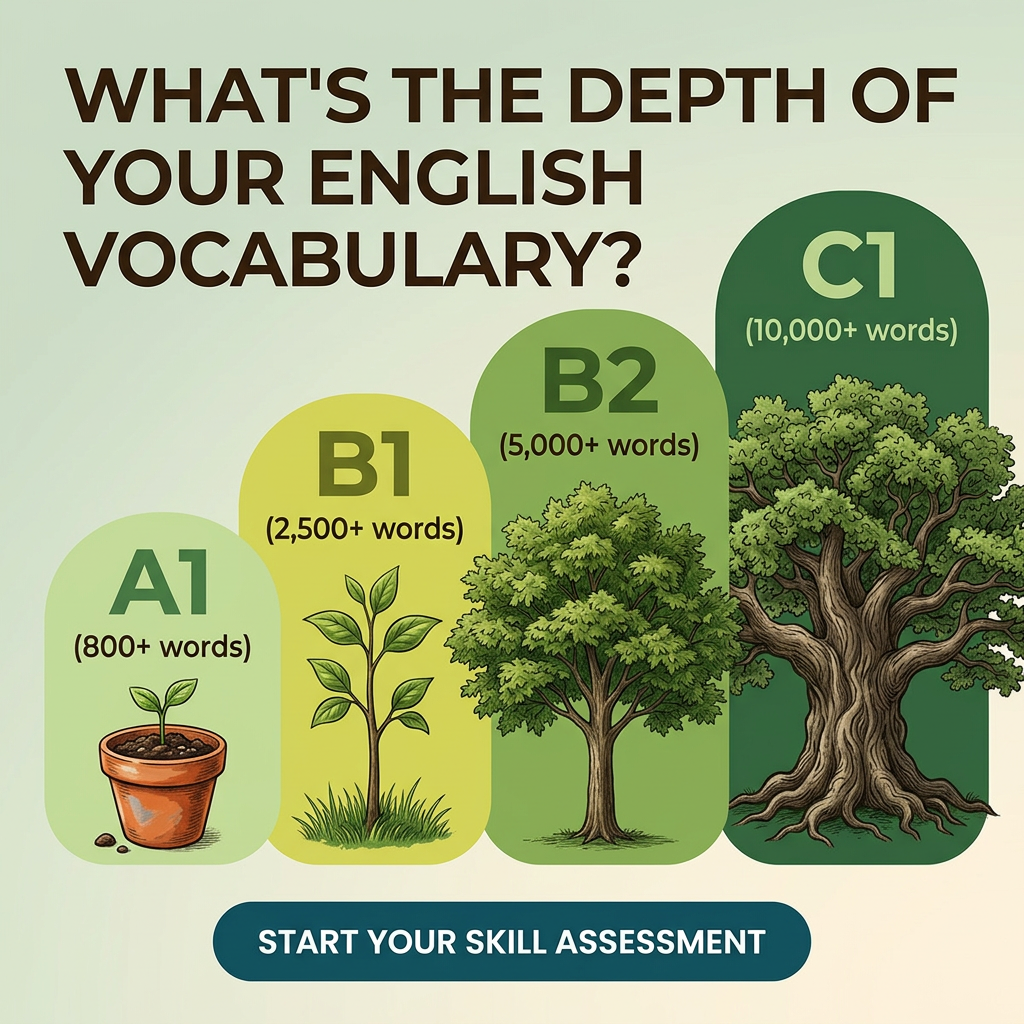
- Format: Level comparison chart illustrated as a growth metaphor.
- Best for: Language apps, tutoring, online courses and any skill-level assessment or quiz funnel.
- Hook: A self-assessment question that makes viewers wonder which tree they are.
- Reuse it: Turn your levels, tiers or stages into a visual progression from small to large.
Available sizes
What is a comparison ad?
A comparison ad sets the product against an alternative, such as a competitor, the old way of doing things or a cheaper option, usually in a two-column layout or table. It helps buyers who are already weighing options see quickly why this one is the better choice.
See all comparison ads →Why this comparison ad works
- 01
Curiosity-driven question
Asking about the depth of your vocabulary makes people instantly place themselves on the scale, which drives clicks to find out.
- 02
Abstract made concrete
CEFR levels mean little to many learners, but word counts and growing trees make progress easy to understand.
- 03
Aspirational progression
The jump from a potted seedling to a mighty oak shows where learners could get to, adding motivation.
- 04
Low-commitment CTA
Start your skill assessment offers a quiz rather than a purchase, which lowers friction and builds a lead funnel.
Full creative breakdown
Who this ad targets
This ad targets non-native English learners aged roughly 18–45 worldwide, including students preparing for exams like IELTS or Cambridge, professionals who need English for work, and people planning to move or study abroad. They are motivated by progress and measurable goals, and many are unsure of their exact level. It suits interest targeting around language learning, study abroad and career development, and works well in markets where English proficiency is linked to job opportunities.
Copywriting analysis
The headline is a single question that combines curiosity with a light challenge, prompting the reader to self-assess. The word depth is a smart choice: it connects vocabulary to roots and growth, matching the visual. The level labels pair official CEFR codes with simple word counts, adding credibility and clarity. The CTA Start your skill assessment is action-oriented and frames the next step as discovery. The primary text should mention that the test is free and quick, since time and cost are the main barriers for a quiz click.
Visual design
The palette moves from pale yellow-green to deep forest green, mirroring growth and reinforcing progress from left to right. The rounded bars act as a simple bar chart, so viewers read the comparison instantly. Hand-drawn tree illustrations add warmth and a storybook quality that softens the academic topic. The heavy, dark brown uppercase headline anchors the top. The dark teal button contrasts with the greens and sits centred at the bottom. Plenty of white space keeps the layout clean and easy to scan on mobile.
How to adapt this template for your brand
- Replace the CEFR levels with your own tiers, stages or skill levels (3–5 steps work best).
- Add a concrete metric for each level, such as words known, hours studied or results achieved.
- Choose a growth metaphor that fits your brand – plants, mountains, buildings or rockets.
- Keep the CTA as a low-commitment quiz, test or assessment rather than a purchase.
- Localise the headline and primary text for each target market while keeping the level labels in English.
Tips for education & e-learning ads on Meta
On Meta, use this as the entry point for a lead-gen or quiz funnel and optimise for completed assessments; translate the primary text into learners' native languages for each market. On Google Display and Performance Max, the chart-like layout reads well at small sizes. On TikTok, animate the trees growing from A1 to C1 with a voice-over asking viewers to guess their level. Avoid guaranteeing specific outcomes such as exam scores.
About this creative
This creative uses a soft green-to-cream gradient background with a bold, dark brown headline across the top: What's the depth of your English vocabulary? Below, four rounded vertical bars rise from left to right like a bar chart, each a deeper shade of green. Each bar shows a CEFR level and a vocabulary size: A1 with 800+ words, B1 with 2,500+ words, B2 with 5,000+ words and C1 with 10,000+ words. At the base of each bar is a hand-drawn illustration that grows with the level: a seedling in a terracotta pot, a young sapling, a full leafy tree and finally a large, ancient oak with spreading roots. A dark teal pill button at the bottom reads Start your skill assessment. The growth metaphor makes abstract language levels feel concrete and aspirational, while the question headline invites self-assessment. The 'depth' wording connects nicely to the visible roots on the final tree.
Meta ad · 1200 × 1200 · Education & E-learning
English Vocabulary Test Ad Template: Grow Your Level
This square education ad visualises CEFR English levels from A1 to C1 as a seedling growing into a mighty oak, each labelled with a vocabulary size. It is an effective template for language apps, tutors and e-learning platforms promoting a free level test or assessment on Meta, Google and TikTok.
Added
All brand names and logos are property of their owners. Adplaylist is not affiliated with or endorsed by these brands.
Details
Ad copy
Primary text
Are you an A1 sapling or a C1 oak? Take our free English vocabulary assessment and find out your CEFR level in minutes. Then get a personalised plan to grow your vocabulary, one word at a time.
Description
Free CEFR vocabulary assessment
On-image text
WHAT'S THE DEPTH OF YOUR ENGLISH VOCABULARY? | A1 (800+ words) | B1 (2,500+ words) | B2 (5,000+ words) | C1 (10,000+ words) | START YOUR SKILL ASSESSMENT (button)
Headline ideas for this template
- 1Are You an A1 Sapling or a C1 Oak?
- 2How Many English Words Do You Really Know?
- 3Find Your English Level in 5 Minutes
- 4Grow From 800 to 10,000 Words
- 5Discover Your CEFR Level – Free
Meta image ad specs
| Placement | Ratio | Size (px) |
|---|---|---|
| Feed | 1:1 or 4:5 | 1080×1080 / 1080×1350 |
| Marketplace | 1:1 | 1200×1200 |
| Messenger inbox | 1:1 | 1200×1200 |
| Stories & Reels | 9:16 | 1080×1920 |
This template is 1:1. Request 4:5 or 9:16 to cover all placements.
Browse similar by tag