Key takeaways
- Format: Product UI shot with presenter, mascot and AI prompt box
- Best for: SaaS and AI feature launches for business teams
- Hook: Three action verbs promising the AI does the work for you
- Reuse it: Show your UI, a real prompt and a confident user to make your AI feature tangible
Available sizes
What is a product shot ad?
A product shot ad puts the product itself at the centre of the frame, usually on a clean or styled background with little text. It works best when the packaging or product is distinctive enough to stop the scroll and the viewer already understands what it does.
See all product shot ads →Why this product shot ad works
- 01
Verb-led benefit
“Plans, writes and optimizes” lists concrete jobs, making the AI promise easy to grasp.
- 02
Real prompt example
The sidekick box shows a realistic request, so viewers instantly see how they would use it.
- 03
Familiar interface
Status chips and columns make the board recognisable to existing users and credible to new ones.
- 04
Playful mascot
The capybara adds personality and stops the scroll in an otherwise corporate category.
Full creative breakdown
Who this ad targets
This ad targets marketing managers, project managers and team leads at small to large companies who coordinate campaigns and content. Many are already monday.com users being encouraged to adopt the AI feature, while others are evaluating work management tools with AI built in. They want to save time on planning and writing and feel pressure to adopt AI without adding complexity.
Copywriting analysis
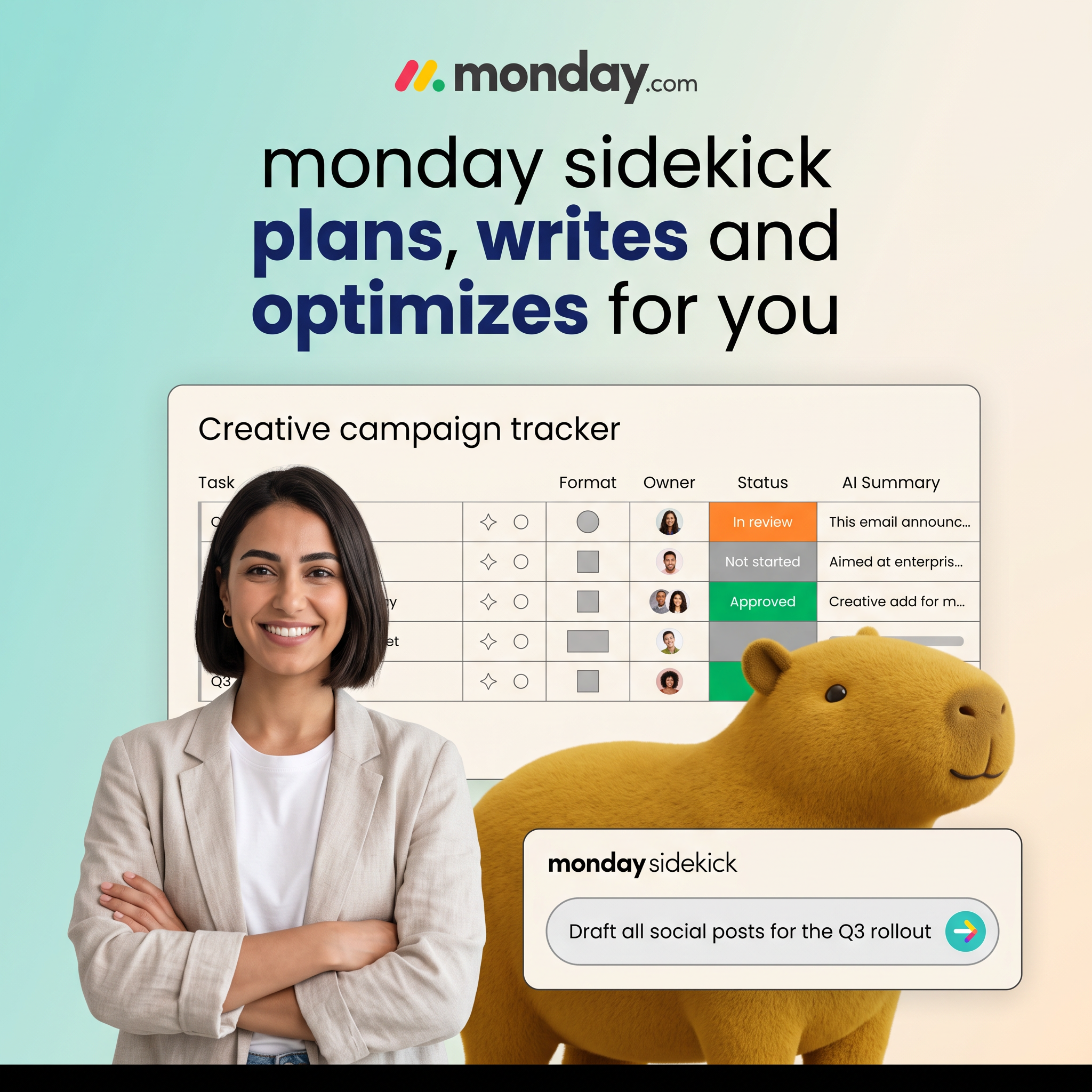
The headline is a clear feature promise built on three verbs that map to everyday work: planning, writing and optimizing. Bolding the verbs lets skimmers get the message in a glance. “For you” shifts effort away from the user, the core appeal of AI. The prompt “Draft all social posts for the Q3 rollout” doubles as copy and demo, showing scale (“all”) and a realistic business context. The rest of the text is UI, adding authenticity rather than extra claims.
Visual design
The design uses layered depth: gradient background, product board, then person and mascot in the foreground, and finally the prompt card floating on top. The board’s orange, grey and green status chips echo monday’s brand colours and draw the eye. The woman on the left and capybara on the right frame the interface. Rounded cards and the soft gradient keep the look modern and friendly. The headline’s mixed weights create a clear reading rhythm.
How to adapt this template for your brand
- Write a headline with three verbs describing what your product does for the user.
- Show a simplified, realistic version of your interface with recognisable UI elements.
- Add a floating prompt or input box with a believable request from your target user.
- Place a confident person in the foreground to humanise the software.
- Consider a mascot or unexpected element to add personality and stop the scroll.
Tips for saas & tech ads on LinkedIn
On LinkedIn, target by job function (marketing, project management, operations) and company size, and test it as a single image versus a short video showing the prompt in action. On Meta, retarget website visitors and existing free-trial users. On Google Display, simplify the layout and keep the headline and prompt box for small sizes. Pair with primary text that mentions a specific time saving.
About this creative
This monday.com creative introduces its AI assistant, sidekick, with a layered collage. A soft teal-to-peach gradient background holds the monday.com logo at the top and a large headline: “monday sidekick plans, writes and optimizes for you,” with the three verbs in bold navy. Below, a stylised “Creative campaign tracker” board shows familiar monday columns, including format, owner, colourful status chips such as In review, Not started and Approved, and an AI Summary column with auto-generated text. In front, a smiling woman in a linen blazer stands with arms crossed, conveying confidence and control. On the right, a large plush capybara, a playful mascot, peeks into the frame. A floating sidekick prompt box at the bottom reads “Draft all social posts for the Q3 rollout,” with a colourful arrow button, demonstrating exactly how a user would ask the AI for help.
LinkedIn ad · 1200 × 1200 · SaaS & Tech
AI Assistant SaaS Ad Template: “monday sidekick Plans, Writes and Optimizes for You”
This square SaaS ad for monday.com promotes its AI assistant, monday sidekick. It layers a campaign tracker board, a confident professional, a plush capybara mascot and a prompt box showing a real task. Use it as a template for AI features, productivity tools or any software where showing the interface builds trust.
Added
All brand names and logos are property of their owners. Adplaylist is not affiliated with or endorsed by these brands.
Details
Ad copy
Primary text
Meet monday sidekick, the AI assistant built into your boards. It plans campaigns, drafts content and optimizes your workflow so your team can focus on the work that matters. Try it today.
Description
Your AI assistant inside monday.com
On-image text
monday.com | monday sidekick plans, writes and optimizes for you | Creative campaign tracker | Task | Format | Owner | Status | AI Summary | In review | Not started | Approved | monday sidekick | Draft all social posts for the Q3 rollout
Headline ideas for this template
- 1Your AI Teammate for Every Campaign
- 2Plan Less. Ship More.
- 3Let AI Draft Your Next Campaign
- 4Work Smarter With an AI Sidekick
- 5From Prompt to Plan in Seconds
Meta image ad specs
| Placement | Ratio | Size (px) |
|---|---|---|
| Feed | 1:1 or 4:5 | 1080×1080 / 1080×1350 |
| Marketplace | 1:1 | 1200×1200 |
| Messenger inbox | 1:1 | 1200×1200 |
| Stories & Reels | 9:16 | 1080×1920 |
This template is 1:1. Request 4:5 or 9:16 to cover all placements.
Browse similar by tag