Key takeaways
- Format: Positioning headline above a cropped, realistic product UI.
- Best for: B2B SaaS, productivity and collaboration tools.
- Hook: A big category claim – the everything app – backed by star ratings.
- Reuse it: Pair one bold positioning line with review proof and your best-looking screen.
Available sizes
What is a product shot ad?
A product shot ad puts the product itself at the centre of the frame, usually on a clean or styled background with little text. It works best when the packaging or product is distinctive enough to stop the scroll and the viewer already understands what it does.
See all product shot ads →Why this product shot ad works
- 01
Bold category claim
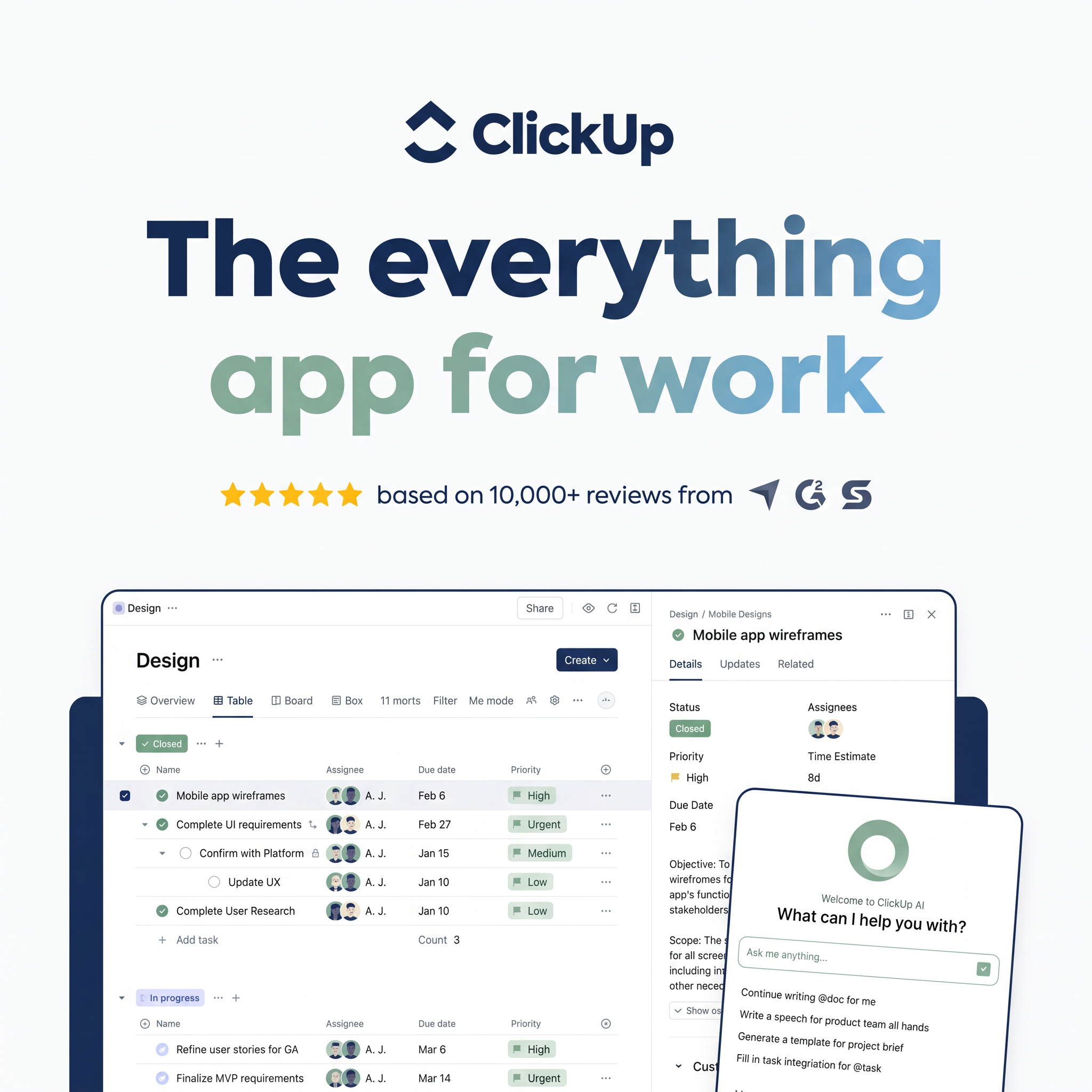
Calling itself the everything app positions ClickUp as a replacement for multiple tools. The gradient makes the line feel modern and memorable.
- 02
Instant trust
Five stars, a large review count and third-party logos answer the question of whether the product is good before viewers ask it.
- 03
Real interface
A realistic task table shows how work would actually look in the tool. Buyers can picture their team using it.
- 04
AI as a differentiator
The tilted AI assistant card highlights a timely feature and breaks the grid, pulling the eye to the newest capability.
Full creative breakdown
Who this ad targets
The ad targets team leads, project managers, operations people and founders at small to mid-sized companies who juggle several tools for tasks, docs and chat. It appeals to buyers frustrated by tool sprawl and curious about AI features. The review proof also helps convince sceptical decision makers comparing project management platforms. It works for cold prospecting on LinkedIn and Meta and for retargeting trial visitors.
Copywriting analysis
The headline is a short, confident positioning statement that defines a new category rather than listing features. Six words cover the full promise: one app instead of many. The review line adds specificity with a precise figure and named sources, which carries more weight than generic praise. Interface text acts as secondary copy, showing realistic task names that match the target audience's daily work. The AI prompts, such as writing a speech or generating a project brief template, hint at practical use cases. No price or discount appears, keeping the tone premium and focused on value.
Visual design
Generous white space at the top gives the headline room to dominate. The navy-to-sage gradient ties into the brand colours and adds depth to flat text. Gold stars provide a small warm accent. The screenshot is cropped so it bleeds off the bottom, suggesting there is more to explore. A navy backing shape frames the UI, and the tilted AI card overlaps edges to add dimension and draw attention to the new feature.
How to adapt this template for your brand
- Write a one-line positioning statement that defines your product's category or big promise.
- Add your star rating, review count and review-site logos directly beneath it.
- Capture a clean screenshot of your product with realistic demo data.
- Crop the screenshot so it bleeds off the bottom edge and frame it with a brand-colour shape.
- Overlay one tilted card that highlights your newest or most unique feature.
Tips for saas & tech ads on Meta
On LinkedIn, this square image fits single-image sponsored content; target job titles such as project manager or operations lead. On Meta, test it against a 4:5 version that shows more of the interface. In Google Display, make sure the headline stays readable at small sizes. Refresh the screenshot regularly so it reflects the current product and use real review numbers.
About this creative
This ClickUp ad uses a clean off-white background and a strong top-to-bottom layout. The navy ClickUp logo sits at the top, followed by a huge two-line headline, the everything app for work, in heavy rounded type with a gradient from navy through blue to sage green. Underneath, five gold stars sit beside the line based on 10,000+ reviews, with small logos from software review sites. The lower half shows a cropped product screenshot framed by a navy shape: a Design workspace with table view, tasks such as mobile app wireframes and user research, assignee avatars, due dates and coloured priority tags. A task detail panel opens on the right, and a tilted card overlaps it with the ClickUp AI assistant asking what can I help you with, plus example prompts. The ad feels polished, credible and feature-rich while staying easy to scan.
Meta ad · 1200 × 1200 · SaaS & Tech
Project Management SaaS Ad Template with UI Product Shot
This square ClickUp ad combines a bold gradient headline, a five-star review line with review-site logos and a cropped product screenshot that includes an AI assistant panel. Use it as a template for B2B SaaS, productivity tools or any software that needs to show its interface and earn trust quickly.
Added
All brand names and logos are property of their owners. Adplaylist is not affiliated with or endorsed by these brands.
Details
Ad copy
Primary text
Tasks, docs, goals and AI – all in one place. Replace your stack of tools with ClickUp, rated five stars across 10,000+ reviews. Get started free.
Description
5 stars from 10,000+ reviews
On-image text
ClickUp | The everything app for work | ★★★★★ based on 10,000+ reviews from (Capterra, G2, GetApp logos) | Design | Overview, Table, Board | Mobile app wireframes | Welcome to ClickUp AI – What can I help you with? | Ask me anything...
Headline ideas for this template
- 1One App to Replace Them All
- 2Stop Switching Tools. Start Shipping Work.
- 3Tasks, Docs and AI in One Place
- 4Rated 5 Stars by 10,000+ Teams
- 5Your Team's New Home for Work
Meta image ad specs
| Placement | Ratio | Size (px) |
|---|---|---|
| Feed | 1:1 or 4:5 | 1080×1080 / 1080×1350 |
| Marketplace | 1:1 | 1200×1200 |
| Messenger inbox | 1:1 | 1200×1200 |
| Stories & Reels | 9:16 | 1080×1920 |
This template is 1:1. Request 4:5 or 9:16 to cover all placements.