Key takeaways
- Format: UI mock-up showing the feature in action, with people for relatability.
- Best for: Productivity SaaS, browser extensions and AI writing tools.
- Hook: Playful rhyme about email struggles solved with one highlight.
- Reuse it: Show your one-step feature inside a tool your audience already uses.
Available sizes
What is a feature callout ad?
A feature callout ad is a static image that shows a single product with short text labels pointing to its key features or benefits, usually joined to the product by thin lines. It explains several selling points at a glance without a long caption, which is why it's common for supplements, skincare, electronics and kitchenware.
See all feature callouts ads →Why this feature callouts ad works
- 01
Shows the exact action
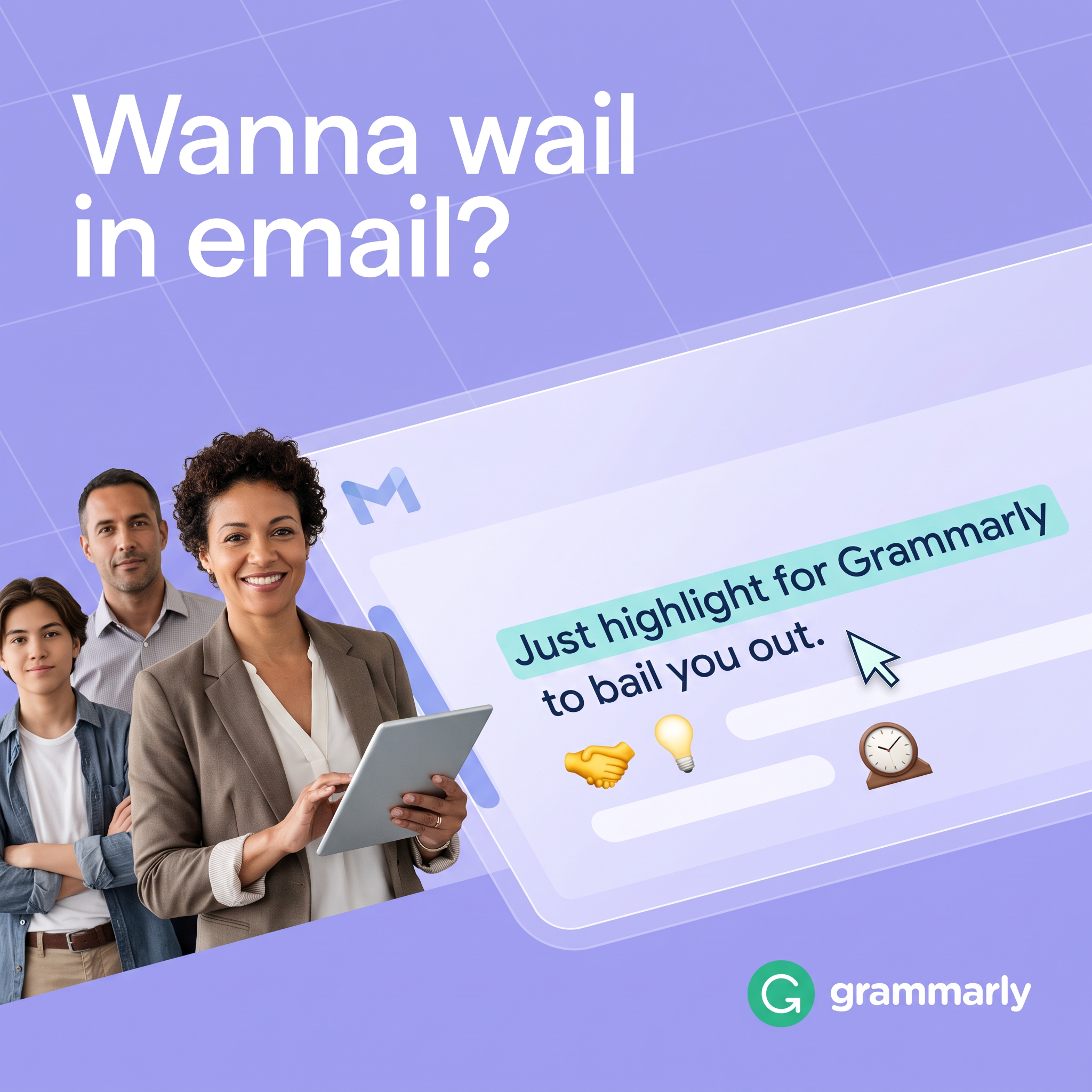
The highlight and cursor demonstrate how simple Grammarly is. Viewers learn the feature without a tutorial.
- 02
Lives where users already work
The Gmail window signals Grammarly works inside a familiar app. There's no new tool to learn.
- 03
Rhyming, playful copy
'Wail' and 'bail' create a rhyme that sticks. It makes a dull task like email feel lighter.
- 04
Diverse group of users
Three people of different ages and styles show the tool is for everyone. It broadens appeal from students to professionals.
Full creative breakdown
Who this ad targets
The ad targets professionals, students and job seekers who write a lot of email and want to sound clear and confident, especially non-native English speakers and people who dread tricky messages. Many use Gmail daily and value quick, in-line help. The mix of people suggests a broad audience, from early-career workers to managers. Targeting would include interests in productivity, business, careers, Gmail and Google Workspace, plus LinkedIn job titles in sales, support and management.
Copywriting analysis
The headline 'Wanna wail in email?' is playful but potentially confusing. 'Wail' means to cry out in distress, so it could be read as 'do you feel like crying over emails?' It may also be a typo for 'nail', which would make a clearer promise, so it's worth checking before reuse. The in-UI line 'Just highlight for Grammarly to bail you out' rhymes with 'wail', creating a memorable pair and casting Grammarly as the rescuer. 'Just highlight' stresses minimal effort. The emoji add quick visual benefits without extra words. Overall the copy is casual and friendly, matching Grammarly's approachable brand.
Visual design
The design uses Grammarly-like lavender as a calm base, with white headline type for strong contrast. The diagonal glassmorphism email window adds depth and modern UI style, while the mint highlight is the brightest element, pulling the eye to the feature. A cursor arrow reinforces the action. The three people on the left balance the right-heavy window and add human warmth. The green logo in the corner provides brand recognition without dominating.
How to adapt this template for your brand
- Pick the one action that shows your product's value, like highlight, click or drag.
- Mock up that action inside a familiar app window, with a cursor and highlight.
- Write a short, playful headline about the pain, ideally with a rhyme or wordplay.
- Add two to four people who represent your user groups on one side.
- Use emoji or small icons to hint at benefits without extra copy.
Tips for saas & tech ads on Meta
On Meta, this works for broad prospecting with a Learn More or Install CTA pointing to a browser extension page. Test a clearer headline such as 'Wanna nail every email?' against the current one. On LinkedIn, target professionals by job function and pair it with a short video showing the highlight in action. For Stories and Reels, animate the highlight and rewrite so the feature unfolds in the first two seconds.
About this creative
This square Grammarly ad sits on a lavender background with a faint diagonal grid. Large white text in the top left asks 'Wanna wail in email?', a playful headline about struggling with emails. A translucent, glass-like Gmail window cuts diagonally across the frame, marked by a blue 'M' icon. Inside, the line 'Just highlight for Grammarly to bail you out.' appears with the first part highlighted in mint, and a cursor arrow hovers next to it, showing the exact action. Small emoji below the text, a handshake, a light bulb and a mantel clock, hint at benefits like collaboration, ideas and saved time. On the left, three professionals stand together: a smiling woman in a blazer holding a tablet, a man in a button-down shirt and a younger person in denim, representing different users. The green Grammarly logo anchors the bottom right corner, closing the ad cleanly.
Meta ad · 1200 × 1200 · SaaS & Tech
Grammarly Email Ad: AI Writing Assistant Feature Template
This Grammarly ad shows its highlight-to-help feature inside a Gmail-style window, next to three professionals. It's a square feature-callout creative for Meta and LinkedIn. Use it as a template for productivity tools, browser extensions or any software where one simple action delivers the value.
Added
All brand names and logos are property of their owners. Adplaylist is not affiliated with or endorsed by these brands.
Details
Ad copy
Primary text
Stuck on a tricky email? Just highlight your text and Grammarly helps you rewrite it to sound clear, confident and professional, right inside Gmail.
Description
Highlight any text and let Grammarly help.
On-image text
Wanna wail in email? | Just highlight for Grammarly to bail you out. | grammarly
Headline ideas for this template
- 1Wanna nail every email?
- 2Highlight. Rewrite. Send with confidence.
- 3Your inbox rescue is one highlight away
- 4Sound clear and confident in every email
- 5Stop staring at that email draft
Meta image ad specs
| Placement | Ratio | Size (px) |
|---|---|---|
| Feed | 1:1 or 4:5 | 1080×1080 / 1080×1350 |
| Marketplace | 1:1 | 1200×1200 |
| Messenger inbox | 1:1 | 1200×1200 |
| Stories & Reels | 9:16 | 1080×1920 |
This template is 1:1. Request 4:5 or 9:16 to cover all placements.
Browse similar by tag