Key takeaways
- Format: Vertical hero shot plus a three-column checkmark feature row.
- Best for: Tech or appliance brands explaining a product range to new buyers.
- Hook: Time-saving promise: perfect cuts in a fraction of the time.
- Reuse it: Keep the split layout and swap in your three strongest features.
Available sizes
What is a feature callout ad?
A feature callout ad is a static image that shows a single product with short text labels pointing to its key features or benefits, usually joined to the product by thin lines. It explains several selling points at a glance without a long caption, which is why it's common for supplements, skincare, electronics and kitchenware.
See all feature callouts ads →Why this feature callouts ad works
- 01
Product shown working
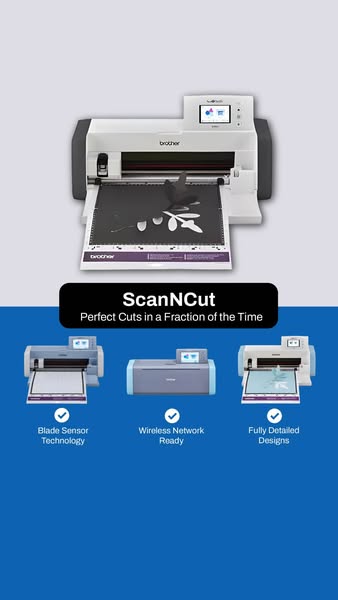
The mat with a half-cut design proves what the machine does. Viewers understand the product without reading.
- 02
Benefit before features
The banner leads with time saved, which is the outcome buyers care about. The features then back it up.
- 03
Checkmarks signal proof
Three checkmarks are fast to scan. They make the product feel complete and capable.
- 04
Range at a glance
Showing three models hints at choice for different budgets. It invites a click to compare.
Full creative breakdown
Who this ad targets
This ad targets crafters, quilters, sewists and scrapbookers who cut shapes by hand or with older machines. It speaks to hobbyists who value precision and speed, plus small makers selling appliqué, stickers or vinyl projects. Features like wireless connectivity and a blade sensor attract tech-curious buyers in the research phase. The audience skews toward women aged 30 to 60 with craft and DIY interests, and people who already follow sewing and Cricut-style communities.
Copywriting analysis
The copy is short and benefit-first. "Perfect Cuts in a Fraction of the Time" combines two desires, quality and speed, in one line, and avoids technical jargon. The product name gets its own bold line, which builds brand recall for ScanNCut as a distinct sub-brand. The three feature labels are written as compact noun phrases that fit the checkmark format. "Fully Detailed Designs" is the weakest, since it is vague; a more specific claim such as a design count would be stronger. There is no CTA on the image, so the button and primary text must drive the action.
Visual design
The two-tone split, light grey on top and Brother blue below, creates a clear visual break and frames the black name banner in the middle. The hero machine is large and centered, while the three model thumbnails are evenly spaced for rhythm. White checkmark icons give consistent visual anchors above each label. The vertical layout fills the full mobile screen and keeps key text in the central safe zone, which suits Stories and Reels.
How to adapt this template for your brand
- Show your hero product doing its job in the top half of the frame.
- Add a bold banner with the product name and one outcome-focused benefit line.
- Switch to your brand color for the bottom half.
- Add three model or feature images, each with a checkmark and a two-to-three word label.
- Keep all text inside the 9:16 safe zone and add a CTA in the primary text.
Tips for crafts ads on Meta
This 9:16 creative is built for Meta Stories and Reels; keep the name banner clear of the top and bottom UI. For Feed, crop to 4:5 by tightening the grey area. Target craft, quilting and DIY interests plus lookalikes of site visitors. Use Learn More rather than Shop Now, since the ad works at the consideration stage. Pair it with a short video of the machine scanning and cutting to boost watch time.
About this creative
This vertical creative is split into two zones. The top half has a light grey background showing a Brother ScanNCut machine head-on, with a cutting mat loaded and a leaf design partially cut, which demonstrates the product in action. A black rounded banner sits at the midpoint, carrying the product name "ScanNCut" in bold white type and the benefit line "Perfect Cuts in a Fraction of the Time". The bottom half switches to a strong Brother blue. Here three smaller product images show different models in the ScanNCut range, each with a white checkmark circle and a short label underneath: Blade Sensor Technology, Wireless Network Ready and Fully Detailed Designs. The structure moves the eye from product, to promise, to proof. There is no price or offer, so the ad works as a consideration piece for crafters researching cutting machines.
Meta ad · 338 × 600 · Crafts
Brother ScanNCut Feature Callouts Ad Example
This Brother ad showcases the ScanNCut cutting machine for crafters and sewists. It uses a vertical feature callouts format: a hero product shot, a bold name bar with a benefit line, and three model images with checkmark features. It suits Stories and Reels placements for craft tech products.
Added
All brand names and logos are property of their owners. Adplaylist is not affiliated with or endorsed by these brands.
Details
Ad copy
Primary text
Spend less time cutting and more time creating. ✂️ Brother ScanNCut scans and cuts fabric, paper and vinyl with precision — with blade sensor technology, wireless connectivity and fully detailed designs built in.
Description
Explore the ScanNCut lineup
On-image text
ScanNCut | Perfect Cuts in a Fraction of the Time | Blade Sensor Technology | Wireless Network Ready | Fully Detailed Designs | brother
Headline ideas for this template
- 1Scan It. Cut It. Done in Minutes.
- 2Perfect Cuts Without the Scissors
- 3The Cutting Machine That Sees Your Design
- 4Cut Fabric, Paper and Vinyl with Precision
- 5Save Hours on Every Craft Project
Meta image ad specs
| Placement | Ratio | Size (px) |
|---|---|---|
| Feed | 1:1 or 4:5 | 1080×1080 / 1080×1350 |
| Marketplace | 1:1 | 1200×1200 |
| Messenger inbox | 1:1 | 1200×1200 |
| Stories & Reels | 9:16 | 1080×1920 |
This template is 1:1. Request 4:5 or 9:16 to cover all placements.
Browse similar by tag