Key takeaways
- Format: Feature callout of an app screen at the first project phase
- Best for: Carousel or sequential storytelling for service journeys
- Hook: 'From project launch…' sets up a before-to-after story
- Reuse it: Use the same phone shot in different settings for each project phase
Available sizes
What is a feature callout ad?
A feature callout ad is a static image that shows a single product with short text labels pointing to its key features or benefits, usually joined to the product by thin lines. It explains several selling points at a glance without a long caption, which is why it's common for supplements, skincare, electronics and kitchenware.
See all feature callouts ads →Why this feature callouts ad works
- 01
Story opener
'From project launch' is unfinished, which creates curiosity and encourages a swipe to the next card.
- 02
Everyday setting
A grocery aisle shows the app fits into normal life, not just time at home.
- 03
Progress visual
The progress bar at the first step makes the journey concrete and easy to follow.
- 04
Matching series
Reusing the screen with a new phase and background turns one asset into a whole sequence.
Full creative breakdown
Who this ad targets
US homeowners who have just signed or are about to sign for a window or exterior project, and want to know what happens next. Busy adults who juggle work, errands and family are the core audience, as the grocery store suggests. It is ideal for retargeting new leads and for onboarding recent customers, showing that the process is organised from the first day.
Copywriting analysis
'From project launch' is a deliberately incomplete phrase that sets up a narrative: from launch to installation to finish. It mirrors the app's own phase label, tying the copy to the UI. The wording is short, neutral and professional. On its own it relies on the sequence, so in a single-image placement it needs supporting primary text. 'Are you ready to turn one day into day one?' is a strong fit, since project launch literally is day one.
Visual design
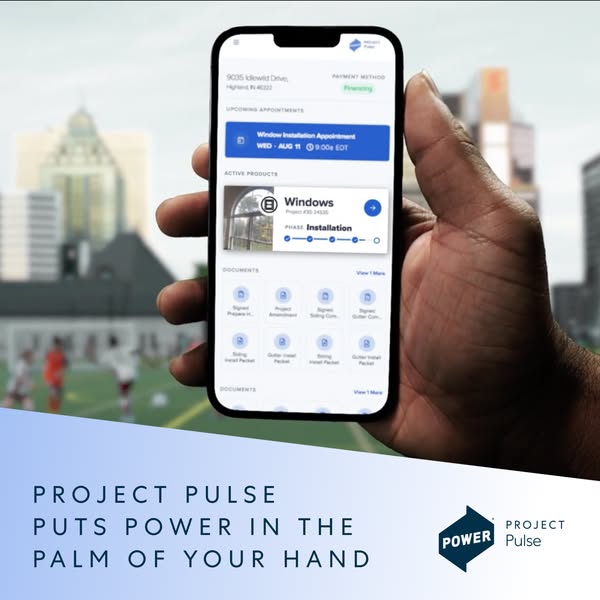
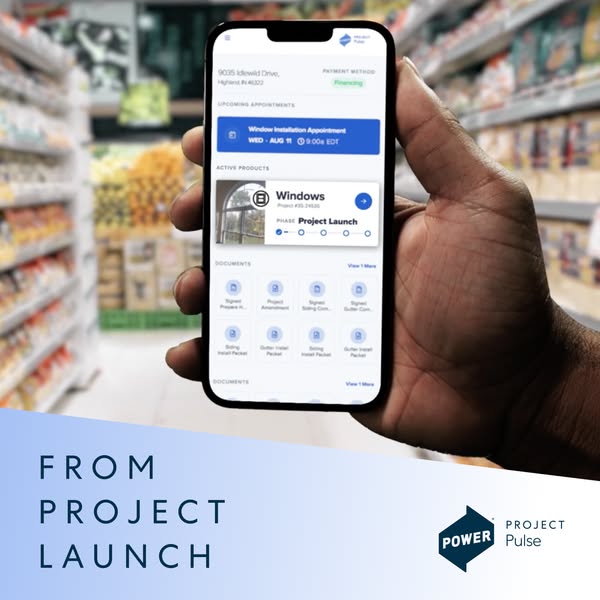
A hand-held phone dominates the frame against a colourful but heavily blurred supermarket background, so the screen stays sharp and readable. The cool blue UI and band contrast with warm shelf colours. A diagonal light-blue gradient band at the bottom carries the left-aligned headline in spaced navy capitals, balanced by the logo on the right. It matches the other Project Pulse creatives exactly.
How to adapt this template for your brand
- Screenshot your app or portal at each stage of the customer journey.
- Composite each screen into a hand-held phone shot in a different everyday setting.
- Write a short line per stage, starting with 'From…' and ending with '…to finish'.
- Use the same band, font and logo position on every card.
- Run them as a carousel and as a sequenced retargeting set.
Tips for home improvement ads on Meta
Run this square on Meta Feed (Facebook and Instagram), where 1:1 holds attention in a scrolling feed and the bottom text band stays clear of UI overlays. Keep the on-image line short so it reads on mobile without zooming, and let the primary text carry the offer. On Google Display and Demand Gen, upload it as a square asset next to a landscape crop. On LinkedIn it suits homeowner-focused retargeting more than cold B2B audiences.
About this creative
The creative shows a hand holding a smartphone in front of a blurred supermarket aisle with colourful shelves of packaged food. The phone shows the Project Pulse app: a customer address in Highland, Indiana, financing as the payment method, an upcoming window installation appointment on Wednesday, August 11 at 9:00 EDT, and an active Windows project whose progress bar sits at the first step, labelled Project Launch. Below is a grid of signed documents such as a project amendment and siding and gutter packets. A light-blue diagonal band across the bottom holds the words 'From project launch' in wide-spaced navy capitals on the left, and the Power Project Pulse logo on the right. The everyday grocery setting shows a homeowner checking their remodel while running errands. The open-ended line suggests a series, inviting viewers to swipe and see the journey continue to installation and completion.
Meta ad · 338 × 600 · Home Improvement
From Project Launch: Project Pulse App Ad by Power
This square ad from Power Home Remodeling shows a hand holding a phone in a grocery store, with the Project Pulse app at the Project Launch phase of a window project. The line 'From project launch' opens a sequence that follows the customer to completion. Use it to tell a step-by-step story across carousel cards.
Added
All brand names and logos are property of their owners. Adplaylist is not affiliated with or endorsed by these brands.
Details
Ad copy
Primary text
Are you ready to turn “one day” into day one? Let us tear the roof off your expectations.
Description
Follow your remodel step by step in the Project Pulse app. Power. Our Work Shows.
On-image text
FROM PROJECT LAUNCH | POWER Project Pulse | app screen: 9035 Idlewild Drive, Highland, IN 46322 · Payment method: Financing · Window Installation Appointment, WED – AUG 11, 9:00a EDT · Windows, Phase: Project Launch · Documents
Headline ideas for this template
- 1From project launch to finished home
- 2Day one starts here
- 3Track your remodel from the very first step
- 4Your project, from launch to done
- 5Power. Our Work Shows.
Meta image ad specs
| Placement | Ratio | Size (px) |
|---|---|---|
| Feed | 1:1 or 4:5 | 1080×1080 / 1080×1350 |
| Marketplace | 1:1 | 1200×1200 |
| Messenger inbox | 1:1 | 1200×1200 |
| Stories & Reels | 9:16 | 1080×1920 |
This template is 1:1. Request 4:5 or 9:16 to cover all placements.