Key takeaways
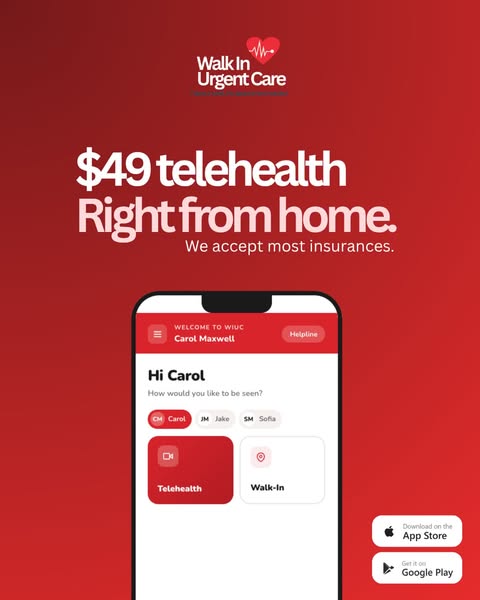
- Format: Price-led headline with a phone mockup of the app and store badges.
- Best for: Urgent care clinics, telehealth apps and services with a fixed price.
- Hook: '$49 telehealth' – a clear price removes cost uncertainty instantly.
- Reuse it: Put your price up front and show your real app screen on a phone.
Available sizes
What is an offer ad?
An offer ad leads with a deal, such as a percentage off, free shipping or a first-order discount, as the main hook. It's built to convert people who already know the brand or are close to buying, and works best with a clear deadline or condition.
See all offer / discount ads →Why this offer / discount ad works
- 01
Price transparency
Opening with $49 answers the biggest question about telehealth – what will it cost?
- 02
Product demo
The phone mockup shows the real booking screen, proving how simple the experience is.
- 03
Family profiles
Carol, Jake and Sofia chips hint that one app covers the whole family's care.
- 04
Insurance reassurance
'We accept most insurances' reduces doubt for people who don't want to pay out of pocket.
Full creative breakdown
Who this ad targets
This ad targets US adults aged 25 to 55, especially parents, who need quick care for minor illnesses without a long trip or wait. The price-first message appeals to uninsured or high-deductible patients, while the insurance line keeps insured users interested. Family profile chips speak directly to parents managing care for children and partners. Busy professionals who want a quick prescription or doctor's note are also a clear audience. App store badges suggest the main goal is app installs, likely geo-targeted around clinic locations.
Copywriting analysis
The headline puts the number first – '$49 telehealth' – which is a strong anchor that makes the service feel affordable and predictable. 'Right from home.' adds the convenience benefit in three words, with the full stop giving it confidence. The supporting line 'We accept most insurances' removes a common objection. Inside the mockup, microcopy like 'How would you like to be seen?' makes the app feel personal and easy. There is no explicit CTA text, but the app store badges act as clear calls to download. Small grammatical touches like 'most insurances' feel casual but slightly less polished.
Visual design
The design uses a bold red gradient that matches the brand logo and stands out strongly in feeds. Large white and pink type fills the upper half, while the phone mockup anchors the lower half and partly runs off the bottom edge, suggesting the screen continues. The mockup uses a clean white interface with red accents, keeping brand consistency. App store badges are placed bottom right in black for strong contrast. The layout is well-balanced and easy to read on mobile.
How to adapt this template for your brand
- Decide on one clear price or price range for your service.
- Write a headline with the price first and a short convenience benefit second.
- Add a line about insurance or payment options to remove cost doubts.
- Place a phone mockup with your real app or booking screen in the lower half.
- Add App Store and Google Play badges if the goal is downloads.
Tips for telehealth ads on Meta
For app install campaigns on Meta and Google App campaigns, use the 4:5 format in Feed and create a 9:16 version for Stories with the mockup scrolling. Make sure the $49 price matches the landing page and app store listing exactly. Geo-target areas around your clinics and test messaging for parents versus young professionals. Use deep links so users land straight on the telehealth booking screen after installing.
About this creative
This 4:5 portrait ad from Walk In Urgent Care uses a strong red gradient background with the brand logo, a heart and heartbeat line, at the top. A bold two-line headline reads '$49 telehealth' in white and 'Right from home.' in pale pink, followed by the smaller line 'We accept most insurances.' The lower half shows a phone mockup of the WIUC app: a welcome bar for user Carol Maxwell with a Helpline button, a friendly 'Hi Carol' greeting, family member profile chips for Carol, Jake and Sofia, and two large options – Telehealth and Walk-In. App Store and Google Play badges sit in the bottom right. The ad combines a price offer with a product demo, showing both what it costs and how easy it is to use. The family profiles suggest one account can manage care for the whole household, which is a subtle but valuable selling point.
Meta ad · 338 × 600 · Telehealth
Telehealth App Ad Example: $49 Price Offer + App Mockup
This portrait ad from Walk In Urgent Care leads with a clear price – $49 telehealth – and shows the app's booking screen on a phone mockup. A red background, insurance line and App Store and Google Play badges complete the layout. Use it as a template for urgent care, clinic apps or any telehealth service with a fixed price.
Added
All brand names and logos are property of their owners. Adplaylist is not affiliated with or endorsed by these brands.
Details
Ad copy
Primary text
Feeling sick? Skip the waiting room. See a provider by video for just $49 – or book a walk-in visit – right from the Walk In Urgent Care app. We accept most insurances. Download now.
Description
Video visits or walk-in. Most insurances accepted.
On-image text
Walk In Urgent Care | $49 telehealth Right from home. | We accept most insurances. | WELCOME TO WIUC | Carol Maxwell | Helpline | Hi Carol | How would you like to be seen? | CM Carol | JM Jake | SM Sofia | Telehealth | Walk-In | Download on the App Store | Get it on Google Play
Headline ideas for this template
- 1See a provider for $49 today
- 2Sick? Get care from your sofa
- 3Telehealth for the whole family
- 4Skip the waiting room for $49
- 5Urgent care in your pocket
Meta image ad specs
| Placement | Ratio | Size (px) |
|---|---|---|
| Feed | 1:1 or 4:5 | 1080×1080 / 1080×1350 |
| Marketplace | 1:1 | 1200×1200 |
| Messenger inbox | 1:1 | 1200×1200 |
| Stories & Reels | 9:16 | 1080×1920 |
This template is 1:1. Request 4:5 or 9:16 to cover all placements.
Browse similar by tag