Key takeaways
- Format: Dashboard-style feature callout square
- Best for: Selling an all-in-one ATS and HR platform
- Hook: Status chips show the journey from interview to hired
- Reuse it: Build a mini dashboard from your product's key metrics and statuses
Available sizes
What is a feature callout ad?
A feature callout ad is a static image that shows a single product with short text labels pointing to its key features or benefits, usually joined to the product by thin lines. It explains several selling points at a glance without a long caption, which is why it's common for supplements, skincare, electronics and kitchenware.
See all feature callouts ads →Why this feature callouts ad works
- 01
Dashboard credibility
Charts, numbers and status chips look like a real product and signal control.
- 02
Full journey visible
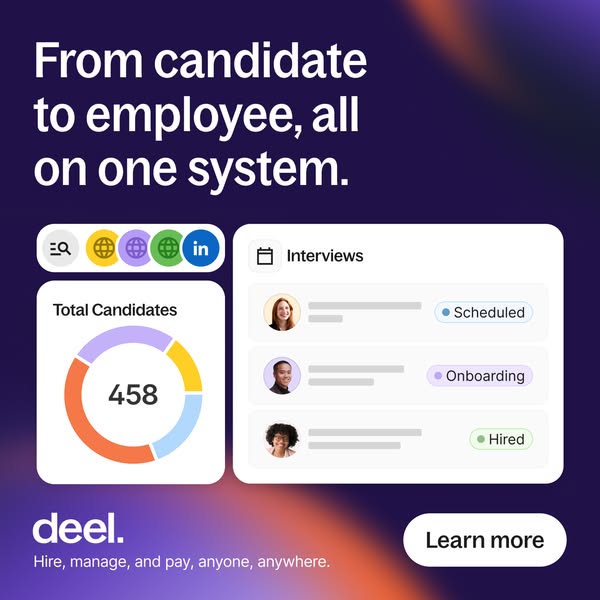
Scheduled, Onboarding and Hired show the transition from candidate to employee.
- 03
Channel integrations
The LinkedIn and globe icons hint at sourcing from many places in one tool.
- 04
Placeholder text keeps focus
Grey bars instead of names keep attention on statuses and numbers.
Full creative breakdown
Who this ad targets
This ad targets talent acquisition leads, in-house recruiters, HR managers and hiring founders at tech and scale-up companies who fill several roles at once, often across countries. They are tired of switching between job boards, spreadsheets, ATS tools and onboarding systems. The creative appeals to teams that want to cut time-to-hire with AI-assisted sourcing and matching, and to buyers who want recruiting connected directly to contracts, payroll and HR in one platform.
Copywriting analysis
The headline frames the core benefit as a journey: from candidate to employee. It addresses the gap many companies have between their ATS and HR or payroll systems, where data is re-entered and context is lost. All on one system closes that gap with a clear, simple promise. The copy is calm and descriptive rather than punchy, suiting buyers in the comparison stage. UI labels, Total Candidates, Interviews, Scheduled, Onboarding and Hired, act as supporting proof points. The Learn more button gives an explicit, low-commitment CTA.
Visual design
The dark purple background with soft orange and violet glows matches Deel's recruiting series. The headline occupies the top third. The lower part uses a grid of white rounded cards with consistent padding, resembling a real dashboard. The colourful donut chart and status chips provide visual interest, while placeholder bars keep the interface uncluttered. The white Learn more pill balances the logo in the footer.
How to adapt this template for your brand
- Choose one product feature and phrase its outcome in a single headline.
- Recreate two or three simplified UI cards that show the feature in action with realistic data.
- Layer the cards over a person photo or gradient background for depth.
- Keep the logo and a one-line value proposition in a consistent footer.
- Build a series where each creative highlights a different feature and test them against each other.
Tips for hr software ads on Meta
On Meta, square 1:1 works across Feed placements; keep critical text inside the centre 80% so nothing gets cropped. On LinkedIn, square single-image ads perform well with B2B audiences; pair them with job-title and company-size targeting and a short, benefit-led intro text. Keep on-image copy under 20 words, use Learn more for cold audiences and switch to Book a demo or Sign up when retargeting warm visitors.
About this creative
This creative is fully UI-led. On a dark purple background with orange and violet gradient glows, the white headline “From candidate to employee, all on one system.” spans the top. Below are three white UI panels. A small pill at top left shows a search icon followed by three coloured globe icons and a LinkedIn logo, representing sourcing channels. Under it, a card titled Total Candidates displays a donut chart in orange, lilac, yellow and blue with 458 in the centre. To the right, a larger card titled Interviews with a calendar icon lists three candidate avatars with placeholder text bars and coloured status chips: Scheduled, Onboarding and Hired. The footer has the Deel logo, the tagline Hire, manage, and pay, anyone, anywhere and a white Learn more button. The ad shows the full pipeline in one glance, from sourcing to a hired employee, supporting the promise that recruiting and HR are connected in a single system.
Meta ad · 338 × 600 · HR Software
Deel Recruiting Dashboard Ad: From Candidate to Employee, All on One System
This Deel ad shows a simplified recruiting dashboard: a donut chart of 458 total candidates, sourcing channel icons and an interviews list with Scheduled, Onboarding and Hired statuses. It is a square feature callout creative that sells an all-in-one hiring and HR system without using any photography.
Added
All brand names and logos are property of their owners. Adplaylist is not affiliated with or endorsed by these brands.
Details
Ad copy
Primary text
Track every candidate from first touch to first payslip. With Deel, sourcing, interviews, hiring and onboarding all live on one system.
Description
Recruiting and HR, fully connected
On-image text
From candidate to employee, all on one system. | Total Candidates 458 | Interviews | Scheduled | Onboarding | Hired | deel. | Hire, manage, and pay, anyone, anywhere. | Learn more
Headline ideas for this template
- 1One system from first interview to first payday
- 2Stop re-entering candidate data
- 3Your whole hiring pipeline in one view
- 4Recruit, hire and onboard without switching tools
- 5458 candidates, one dashboard
Meta image ad specs
| Placement | Ratio | Size (px) |
|---|---|---|
| Feed | 1:1 or 4:5 | 1080×1080 / 1080×1350 |
| Marketplace | 1:1 | 1200×1200 |
| Messenger inbox | 1:1 | 1200×1200 |
| Stories & Reels | 9:16 | 1080×1920 |
This template is 1:1. Request 4:5 or 9:16 to cover all placements.
Browse similar by tag