Key takeaways
- Format: Front and back product shot on a gradient with a soft CTA headline.
- Best for: Introducing a new product line to existing customers.
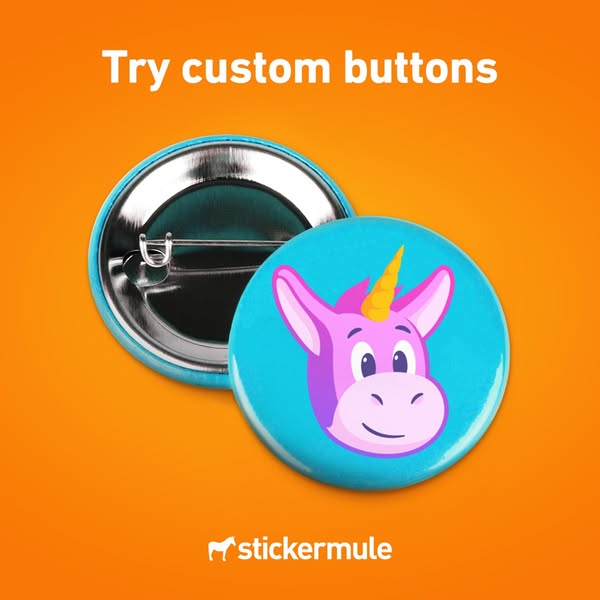
- Hook: A unicorn mule mascot adds charm to a simple product shot.
- Reuse it: Show your product from two angles to explain how it works.
Available sizes
What is a product shot ad?
A product shot ad puts the product itself at the centre of the frame, usually on a clean or styled background with little text. It works best when the packaging or product is distinctive enough to stop the scroll and the viewer already understands what it does.
See all product shot ads →Why this product shot ad works
- 01
Front and back in one
Showing the pin back explains the product mechanics. Buyers know exactly what they get.
- 02
Mascot twist
The unicorn mule is a playful version of the brand mascot. It adds charm and brand recall.
- 03
Low-pressure CTA
“Try custom buttons” invites trial without pushing. It suits cross-selling to existing customers.
- 04
Glossy premium finish
Light reflections show the button's quality. A shiny surface makes the product feel valuable.
Full creative breakdown
Who this ad targets
This ad targets existing Sticker Mule customers and similar audiences who might add buttons to their merch, such as illustrators, bands, small businesses, schools and event organisers. The cute unicorn design also appeals to fans of kawaii and pastel aesthetics. Targeting could include past purchasers, website visitors, lookalikes of sticker buyers and interests in merch, conventions, illustration and activism. It works especially well as a cross-sell creative in retargeting.
Copywriting analysis
The headline “Try custom buttons” is soft and inviting. The verb “try” lowers the commitment barrier, suggesting buttons are an easy add-on rather than a big purchase. It is short, clear and product-focused. The ad has no other copy, so the image carries the details. This works for awareness or cross-selling, but the primary text should add reasons to buy, like quick turnaround, low minimums and free shipping, plus examples of use cases such as events, bands, fundraisers and political campaigns, so viewers can picture their own order.
Visual design
The visual uses a radial orange gradient that creates a spotlight effect on the product. The turquoise button contrasts strongly with orange, making it the clear focal point. The glossy surface and metal back are lit to show texture and depth. The two buttons overlap at an angle, creating dimension. White typography at the top and the logo at the bottom frame the composition symmetrically, keeping the layout clean and balanced.
How to adapt this template for your brand
- Show your product from the front and back in one overlapping composition.
- Use a radial gradient background in your brand colour for a spotlight effect.
- Choose a design with a contrasting colour so the product pops.
- Write a soft CTA headline using a low-commitment verb like “Try”.
- Centre the logo at the bottom to frame the layout.
Tips for printing services ads on Meta
On Meta, run this square creative in Feed and Explore placements, where 1:1 holds attention without cropping. Keep the headline and logo inside the centre 80% so nothing gets cut by UI overlays. Pair it with a short primary text and a clear Shop Now button. Test it in Advantage+ campaigns against a 9:16 version for Stories and Reels, and refresh the creative every two to three weeks to avoid ad fatigue with high-frequency audiences.
About this creative
This square ad has a warm orange background with a soft radial gradient that makes the centre glow. At the top, the headline “Try custom buttons” is set in bold white sans-serif. In the middle are two round pin-back buttons. The back button is flipped to show its shiny metal back and safety pin clasp. The front button overlaps it and shows a turquoise background with a cartoon pink unicorn, which is actually Sticker Mule's mule mascot with a golden horn added. The glossy finish catches the light, making the button look premium and tactile. The white Sticker Mule logo sits centred at the bottom. The composition is simple and symmetrical, focusing entirely on the product. By showing both the front and the back, the ad answers two questions in one image: what the button looks like and how it attaches, making it a clear introductory product ad.
Meta ad · 338 × 600 · Printing Services
Custom Button Ad Template: Sticker Mule Unicorn Button
This Sticker Mule ad shows a glossy custom button with a pink unicorn-mule mascot on a turquoise background, placed beside another button flipped to show its metal pin back. The simple headline “Try custom buttons” makes it a clean product-shot template for introducing a new product line.
Added
All brand names and logos are property of their owners. Adplaylist is not affiliated with or endorsed by these brands.
Details
Ad copy
Primary text
Little buttons, big personality. 🦄 Try custom buttons from Sticker Mule for your brand, band or event. Upload your design, get a free proof and enjoy free shipping.
Description
Custom printing that kicks ass. Free shipping.
On-image text
Try custom buttons | stickermule
Headline ideas for this template
- 1Pin your brand on everyone
- 2Buttons that make people smile
- 3Try custom buttons, shipped free
- 4Small buttons, big impact
- 5Add buttons to your merch
Meta image ad specs
| Placement | Ratio | Size (px) |
|---|---|---|
| Feed | 1:1 or 4:5 | 1080×1080 / 1080×1350 |
| Marketplace | 1:1 | 1200×1200 |
| Messenger inbox | 1:1 | 1200×1200 |
| Stories & Reels | 9:16 | 1080×1920 |
This template is 1:1. Request 4:5 or 9:16 to cover all placements.
Browse similar by tag